
What Are Flexographic Printers?
Flexographic printers, often referred to as flexo printers, are rotary printers that apply high-resolution graphics and text onto continuously-moving material. Flexo printers can be easily integrated into nearly any production or converting line or used in offline roll-to-roll print stations.
Flexo printers are an excellent choice for these types of printing applications:
- High quality logo printing is desired
- Printed messages do not change often
- Printed logos or messages are large
- The budget for printing equipment is limited
- Simple/low-tech printing machines are desired

How Flexographic Printers Work
Flexographic printing is a method of direct contact printing. A flexo printer consists of multiple wheels that work in unison to pick up ink from an ink pan, deliver the ink to a printing plate or die, and transfer the ink onto the material being marked.

Components of a Flexo Printer
Ink Pan – The ink pan contains the ink for the anilox roll to pick up.
Anilox Roll – The surface of an anilox roll features a pattern of cells designed to pick up and hold precise amounts of ink.
Doctor Blade – The doctor blade shaves away excess ink, ensuring that a thin, even layer of ink is applied to the printing plate(s). This process is called metering.
Print Wheel – The print wheel holds the printing plate(s) as well as two friction bands.
Printing Plates – Rubber or photopolymer plates formed with raised characters or designs for the ink to be applied to.
Friction Bands – Continuous bands of rubber that stay in constant contact with the material being printed. As the material moves, this contact creates the friction required to turn the print wheel.
Backup Roll – This roll supports the material being printed and the weight of the flexo printer.
Friction Driven
Flexographic printers require no electricity to operate. They can be driven simply by friction. When the print wheel comes into contact with the material being printed, the friction of this contact is what makes the print wheel turn. Because the printer’s print wheel and anilox roll are joined together with a chain drive system, they rotate in unison. Therefore, the printer always operates at the speed of the production line.
Ink Metering Systems
In flexography, the process of applying a consistent film of ink to printing plates is called metering. The key to uniform ink metering is the anilox roll.
The surface of an anilox roll is engraved with a pattern of microscopic, specially-shaped cells that store and release ink onto the printing plate. The size, depth, and density of cells per inch determine the volume of ink transferred to the printing plate. The line screen is an expression of the number of cells per square inch on the roll.
There are two main ways to get ink onto the anilox roll, as described below.

One-Roll Metering System
In a one-roll system, the anilox roll dips into the ink and is then metered (wiped) by a doctor blade that removes excess ink. Only the controlled ink film remaining in the engraved cells is transferred to the printing plate. A one-roll system is straightforward, fast to adjust, and contains fewer wear parts. For operators who need quick color changes or frequent cleaning, the simplicity of a one-roll system is a practical benefit.

Two-Roll Metering System
A two-roll system uses a pickup roll to transfer ink from the pan to the anilox roll. The anilox roll then delivers ink to the printing plate. This setup is widely used in industry, but there is more variability in the two-roll system, with the main issue being a lack of control over the amount of ink transferred to the plate.

Material Considerations
Many factors can affect whether or not flexographic printing is suitable for your material and production environment. Consider the following attributes of your products and facilities:
Material Form
Flat materials – Flexographic printers are suitable for printing on nearly any flat material, both porous and non-porous. Combined with Pannier’s extensive range of industrial printing inks, they are used to print on:
- Sheet metals and foils
- Paper and lumber products
- Plastic films
- Woven and nonwoven textiles
Non-flat products – Specialized flexo printers can print on non-flat products such as pipe, hose, and extruded products with channels or special profiles.



Continuous material – Flexo is excellent for continuous materials with no breaks.
Individual products – Flexo printers can be adapted to printing on individual items such as boxes, boards, and pre-cut pipes through the use of automatic feed mechanisms.
Surface Condition
Surface contaminants – Surfaces must be free from dust, water, heavy oil, or loose contamination to ensure adhesion and print consistency.
Surface texture – Smooth surfaces offer the best print adherence. Moderately textured materials can be printed to a point, but extreme textures can reduce effective contact and transfer.
Ambient Environment
Temperature and humidity – The temperature of the product and the conditions of the surrounding environment at the time of printing must be considered when choosing the right type of ink.
Climate fluctuations – Changes in temperature or humidity, such as those caused by seasonal weather changes, can affect ink drying times. Solvents can be added to increase or decrease drying time.
Line Speed
The production line speed and the amount of time available for the ink to dry will affect the type of ink being used and where the printer can be installed on the production line.
Choosing the Right Printer Size
Selecting a flexographic printer begins with defining the size of the printed message, rather than the width of the material being printed. The key considerations are how large the message is and how often it must be repeated. These determine the print wheel width and print wheel circumference, respectively.
Print Wheel Width
The width of the print wheel determines the maximum width print you can make on your product. A wider wheel allows printing across a wider substrate, but that same printer can also print only a narrow region if needed. Narrow printers, in turn, can be grouped to form composed messages or to print on multiple lanes of material simultaneously.
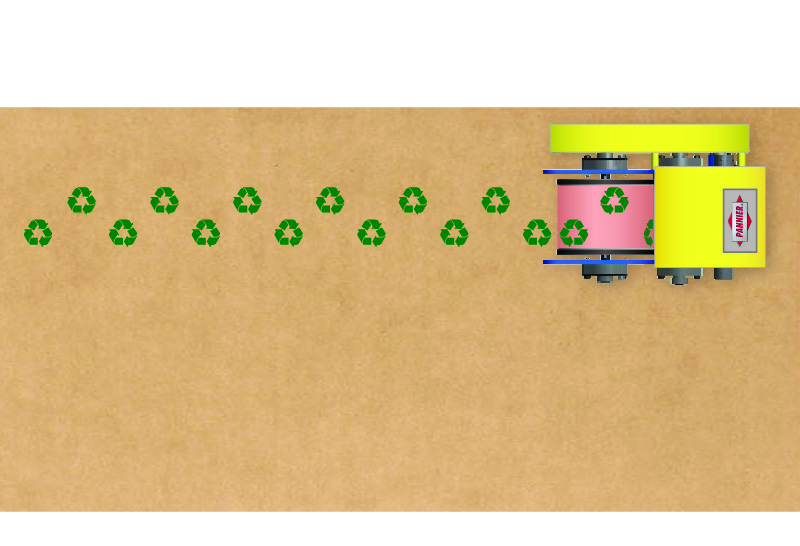
Single mini flexo printer.
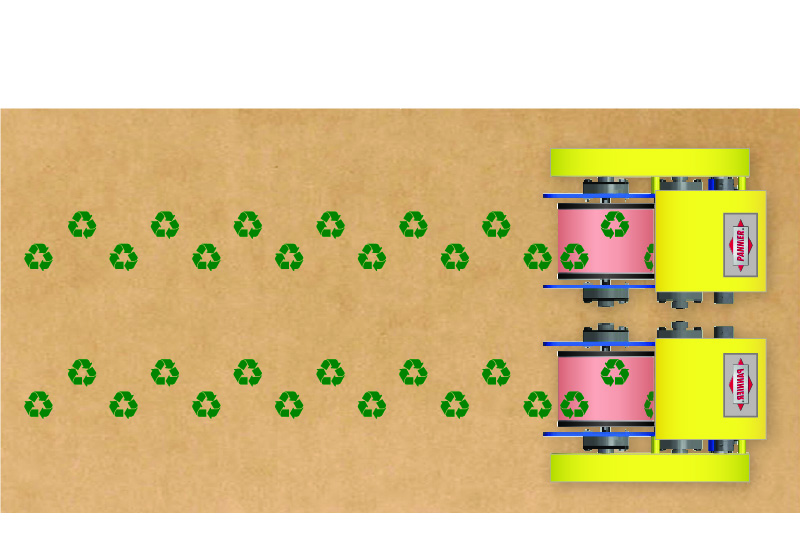
Two flexo printers spaced close together.

Three flexo printers staggered across web.
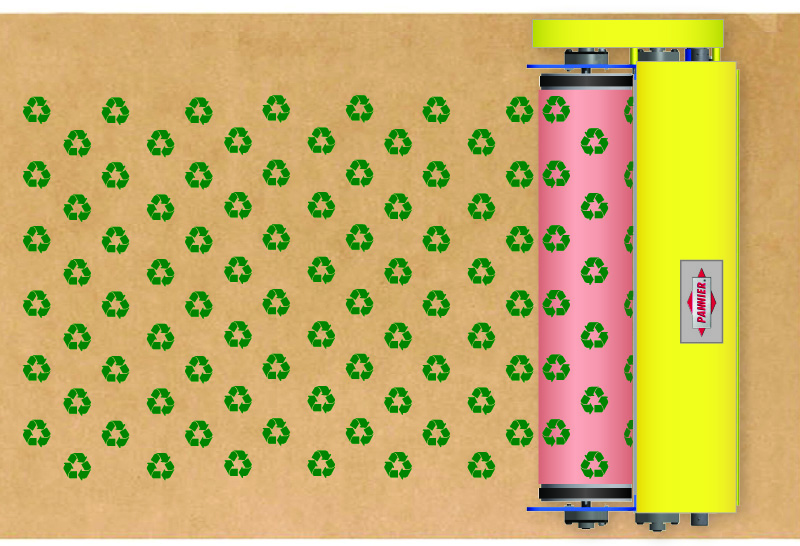
Wide flexo printing across wide web.
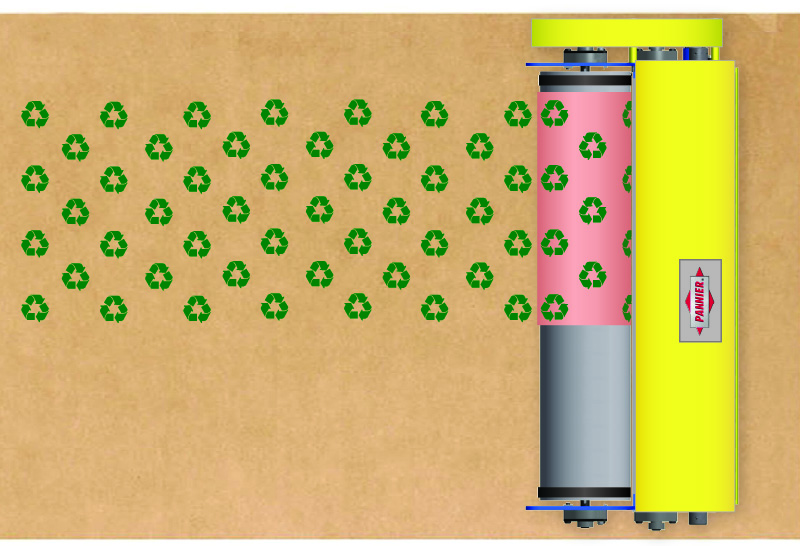
Wide flexo printing across partial web.

Wide flexo printing on narrow web.
Print Wheel Circumference
The circumference of the wheel determines the maximum length of the printed message and how far apart repeated prints will appear on the material.
The circumference of the print wheel determines:
- the maximum length of the printed message, and/or
- the maximum distance between the start of each print.
The same size message can be printed with three different print wheels, but increasing the circumference of the wheel increases the space between each repeat of the message.

Printing Plate & Die Options
Flexo printers use printing plates or dies to carry the raised image, which leaves a print on the substrate.
Printing Plates
Printing plates typically feature larger designs and arrays of text and can cover the entire surface of a flexo print wheel using one of a variety of mounting methods. Plates are made of either photopolymer or rubber. Rubber plates offer more durability and longevity when printing on challenging materials.


Printing Dies
Rubber dies typically feature a single line of information, such as text or stripes, or single characters and phrases that can be arranged into complete messages. Dies are used only on small printers, such as Pannier Super Ink Print-All mini flexo printers or Offset Printers.


Incorporating Flexo Printers Into Your Production Line
Printers can be mounted directly onto an existing production line by simply mounting the printer on a shaft. Air cylinder kits are used to pivot the printer into and out of printing position. Printers can be mounted on a vertical pass line or on the top or bottom of a horizontal pass line.
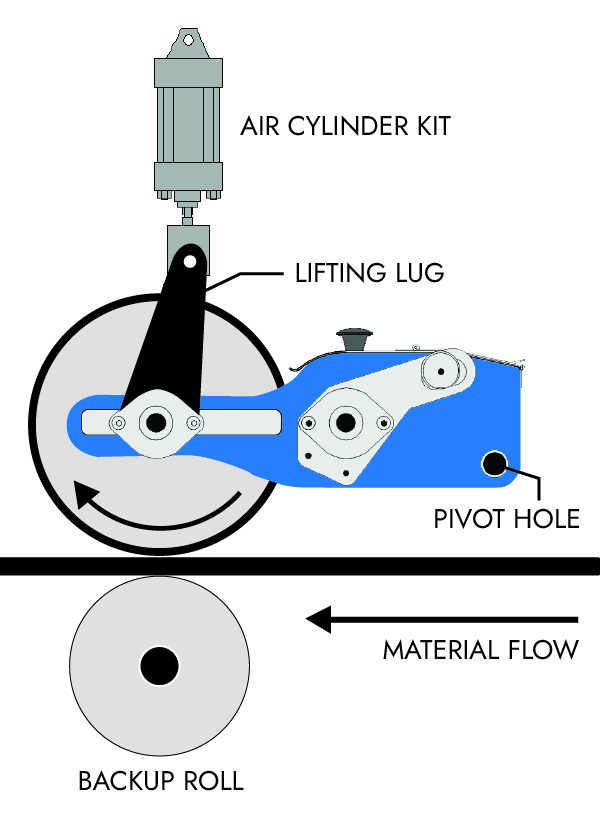
Top line mount.
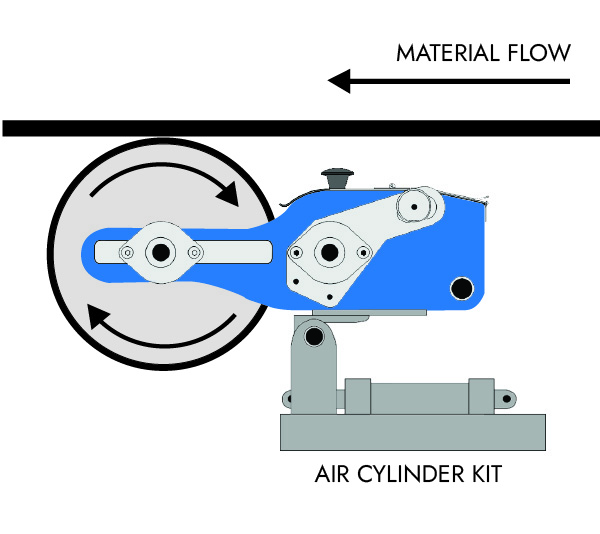
Under line mount.
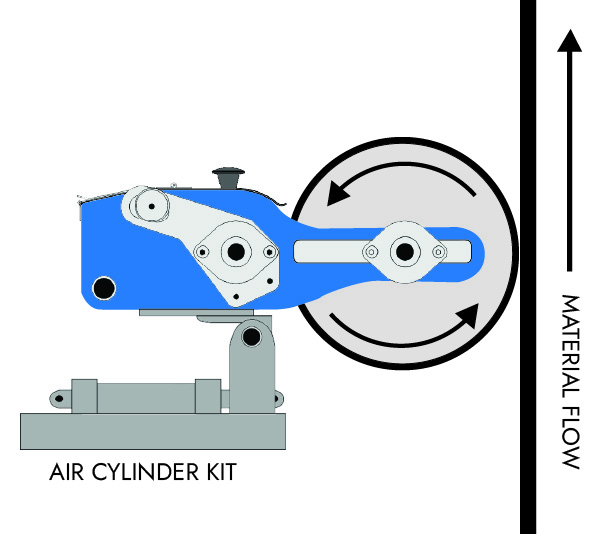
Vertical pass line mount.
Custom Frames and Mounts
Pannier designs and manufactures a variety of custom mounting structures for flexo printers. Structures can incorporate sturdy support frames, backup rolls, and air cylinder kits tailored for easy incorporation into your production line or roll-to-roll print station.

Heavy-duty floor mount frame.

Mobile frame for occasional printing.
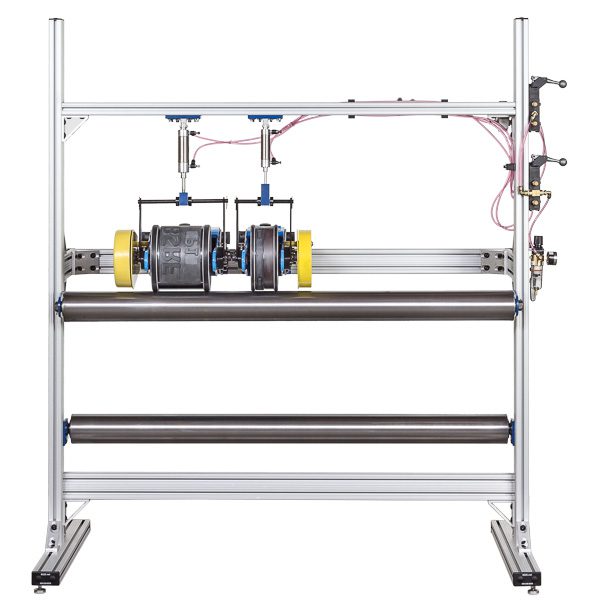
Mounting frame for multiple mini flexo printers.
Ink Management
Flexographic printing inks are formulated for specific uses, and a variety of factors are taken into consideration to determine the best ink for your application such as: the material being marked, how fast the ink needs to dry, whether the printing needs to be temporary or permanent, and the conditions the printed message must withstand.
Ink Supply Methods
- Manual pour – Operators pour ink into the ink pan for small runs.
- Bottle feed – Controlled bottle feeds, used with smaller printers, automatically maintain the optimum ink level in the ink pan.
- Pumps – Pumped delivery is best for high-volume production where continuous, consistent ink supply is needed.

Model 9670 SIPA, with ink reservoir open
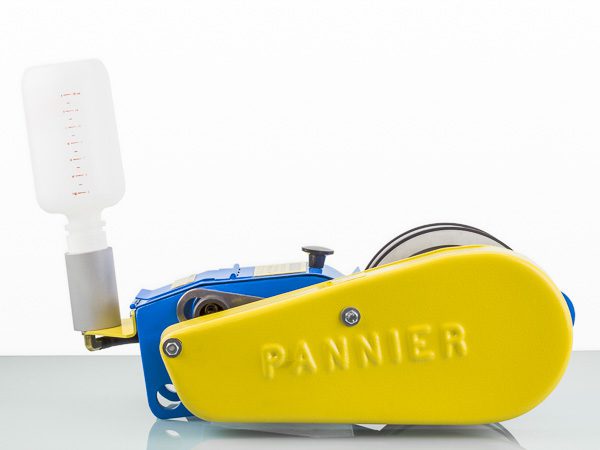
quart bottle ink feed system
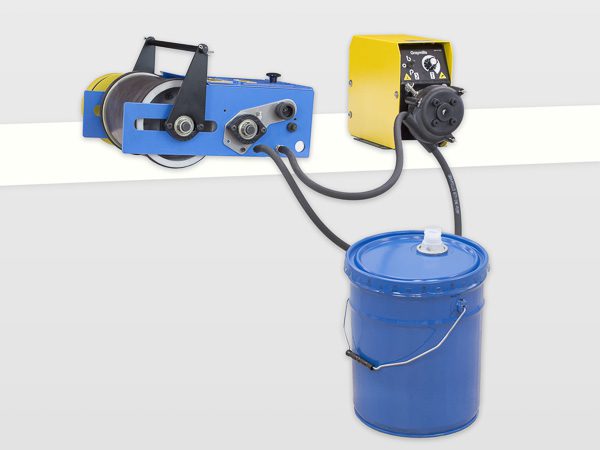
flexographic printer 5-gallon ink pump system
Ink Viscosity Control
Maintaining correct viscosity is essential for uniform print density and drying performance. Viscosity is the measure of the ink’s “thickness” which is crucial for print quality. Changes in ambient temperature and humidity can affect ink viscosity. Every ink has a compatible solvent that can be used to speed up or slow down dry times. Opacity of the print can be affected, so in some cases specially formulated inks need to be used.
Cleanup and Color Changes
Flexo printers must be cleaned of all ink at the end of every run to prevent ink from drying on the anilox roll and other components.
Cleaning Procedure
- Empty any remaining ink from the ink pan.
- Clean the ink pan, rolls, and doctor blade with the corresponding solvent.
- Collect solvent waste into a container for reuse or appropriate disposal in accordance with local regulations.
- Wipe down the print wheel and plate area to prevent buildup.
- Clean printing plates and store them appropriately to prevent damage.
Cleaning Best Practices
- Use manufacturer-approved solvent or cleaner compatible with your ink.
- Avoid the use of tools or anything abrasive on the anilox roll to prevent damage to the cell pattern.
- Ensure proper ventilation and PPE when using solvents.